Service Task
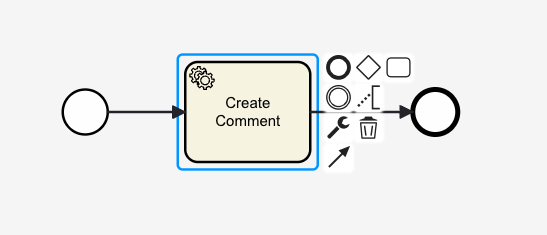
Service tasks in tSM form the backbone of automated workflows, enabling robust integration and efficient process execution. By leveraging scripting, connectors, and tSM services, service tasks ensure that complex operations are handled seamlessly, improving overall operational productivity.
Key Features
- Automation: Service tasks are designed exclusively for automated execution, ensuring consistency and efficiency in workflows.
- Scripting Integration: tSM uses scripting as the primary method of communication within the process, enabling dynamic interactions between process variables and system logic.
- Seamless Integration: Service tasks support a wide range of connectors and tSM services to interact with APIs, databases, messaging systems, and more.
Scripting in Service Tasks
tSM scripting enables service tasks to interact directly with process variables, states, and owning entity properties. This approach ensures precise control over task execution and data flow.
Core Concepts in tSM Scripting
-
Process Variables:
#execution,#variables, and#variablesLocalallow interaction with the process state and variables.- For example:
#variables.taskPriority = "High"dynamically assigns a priority during task execution.
-
Owning Entity Variables:
- Variables like
#ticket,#order, and#customerrepresent the owning entity of the task. These are used to map properties to and from method calls. - Example:
<bpmn:serviceTask id="updateTicketStatus" name="Update Ticket Status"
  camunda:expression="#ticket.status = 'RESOLVED'" />
- Variables like
-
tSM Business Services:
- Use services like
@commentServiceor@notificationServiceto perform specific business operations. - Example:
<bpmn:serviceTask id="addComment" name="Add Comment"
  camunda:expression="#{@commentService.createComment({ownerId: #ticket.id, comment: 'Task completed'})}" />
- Use services like
Mapping Variables and Results
- Mapping Parameters: Map process variables and owning entity properties to method parameters in service calls.
- Result Handling: Automatically update owning entity or process variables with the results of method execution within the script.
Example:
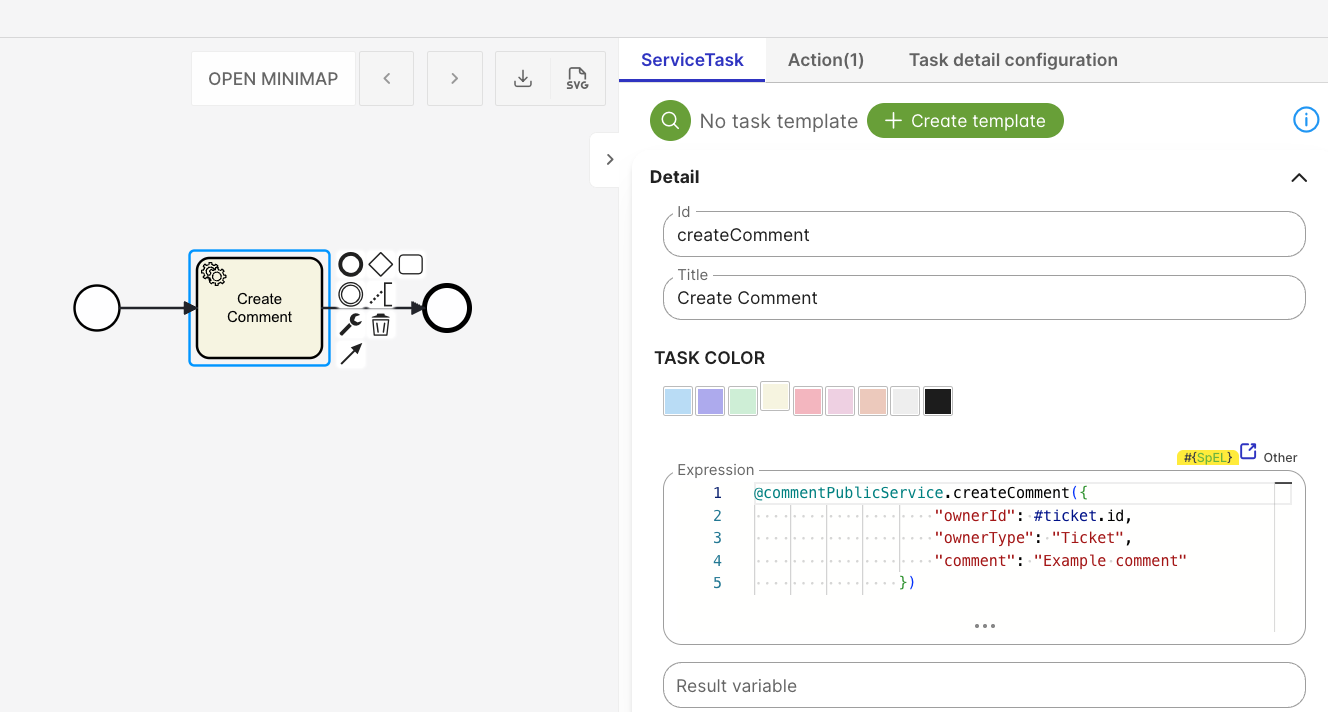
<bpmn:serviceTask id="createComment" name="Create Comment" camunda:exclusive="false"
camunda:expression="#{@commentPublicService.createComment({ "ownerId": #ticket.id, "ownerType": "Ticket", "comment": "Example comment" })}"
tsm:description="<p></p>" tsm:color="#f6f4e0">
<bpmn:documentation>Example comment</bpmn:documentation>
<bpmn:extensionElements>
<camunda:executionListener expression="#{@logPublicService.createLog({ "logTypeCode": "Comment.Log", "ownerType": "Ticket", "ownerId": #ticket.id, "request": "Just sample of log to a service task", "startDate": #now(), "endDate": #now() })}" event="end" tsm:name="Log action" />
</bpmn:extensionElements>
<bpmn:incoming>Flow_173g8gj</bpmn:incoming>
<bpmn:outgoing>Flow_1sldk9d</bpmn:outgoing>
</bpmn:serviceTask>
Script Binding
tSM allows you to execute existing scripts from BPMN processes using script binding, eliminating the need to write SpEL code manually. Instead of embedding logic directly into expressions, you select a script, configure its parameters using a form, and let the runtime execute it safely and consistently.
This approach works the same way for Service Tasks and BPMN Listeners.
What problem does script binding solve?
Scripts can be executed using expressions such as:
@script.finance.convert(#amount, 'USD', 'CZK')
This approach works well for ad hoc and simple scripts, but can become problematic for more complex logic:
- parameters must be escaped correctly
- expressions become unreadable as complexity grows
- reuse across multiple tasks or processes is difficult
- UI support is limited
For complex or reusable logic, script binding is a better fit — it lets you maintain scripts separately with well-defined parameters that can be utilized across tasks and processes:
- you select a maintained script
- you fill in its parameters using a form
- expressions are evaluated safely at runtime
- the same script can be reused in different tasks and processes
How script binding works
When you attach a script to a BPMN element:
-
You choose a script (identified by
scriptCode) -
tSM displays the script's input form
-
You fill in the parameters (values or expressions)
-
The process runtime:
- evaluates expressions
- validates parameter types
- executes the script
Configuring script parameters
Script parameters are configured using tSM Forms based on JSON Schema.
Using expressions in parameters:
Form fields may accept SpEL expressions such as #{dateTime().plusDays(2)}. Expressions are evaluated at runtime, not when the model is saved.
Script parameters are validated using an explicit runtime type definition called evaluatesTo. This ensures that expressions are evaluated to the correct type at runtime.
Runtime behavior
At runtime, tSM performs the following steps:
- Reads the selected script
- Reads the parameter values from the form
- Evaluates all
#{...}expressions and validates the result types usingevaluatesTo - Executes the script with the resolved parameters
If any step fails, the process fails with a meaningful error message.
Example
The following service task uses script binding for its main logic (finance.convert) and an execution listener with script binding to write a comment after the task completes:
<bpmn:serviceTask id="convertCurrency" name="Convert Currency"
camunda:delegateExpression="#{tsmScriptDelegateExecutor}">
<bpmn:extensionElements>
<!-- Main task logic: script binding for currency conversion -->
<camunda:field name="scriptCode" stringValue="finance.convert"/>
<camunda:field name="paramsJson"
stringValue="{"amount":"#{#variables.amount}",
"sourceCurrency":"USD",
"targetCurrency":"CZK"}"/>
<!-- Action after task completes: script binding for writing a comment -->
<camunda:executionListener event="end"
delegateExpression="#{tsmScriptListenerExecutor}">
<camunda:field name="scriptCode" stringValue="comment.create"/>
<camunda:field name="paramsJson"
stringValue="{"ownerId":"#{#ticket.id}",
"ownerType":"Ticket",
"comment":"Currency conversion completed"}"/>
</camunda:executionListener>
</bpmn:extensionElements>
<bpmn:incoming>Flow_1</bpmn:incoming>
<bpmn:outgoing>Flow_2</bpmn:outgoing>
</bpmn:serviceTask>
In this example:
- The service task delegates execution to
tsmScriptDelegateExecutor, which resolves the scriptfinance.convertand passes the configured parameters. - The execution listener on the
endevent usestsmScriptListenerExecutorto run thecomment.createscript, writing a comment to the ticket after the task finishes. - Both use the same
scriptCode+paramsJsonpattern — parameters are filled in via a form in the modeler, and#{...}expressions are evaluated at runtime.
Connectors Overview
tSM provides a variety of connectors to enable seamless integration with external systems and devices:
Generic Connectors
- REST/SOAP Client: For API interactions.
- Database Client: For executing SQL queries.
- Messaging: Integration with Kafka or JMS for message-based communication.
- SSH, SNMP: For direct device access and management.
Integration Connectors
- Public Registers: Access to address and company data.
- Communication Platforms: Google Chat, MS Teams.
- Project and Network Management: Jira, Netbox.
- NMS Systems: Cisco, Huawei, Fortimanager integrations.
- Infrastructure Tools: Netconf, Ansible, Terraform.
- On-Demand Integration: Custom connectors for legacy systems.
tSM Out-of-the-Box Services
tSM includes over 100 pre-configured services to streamline integration and automation. Examples include:
- Catalog Service: Manage product catalogs.
- Inventory Service: Handle network and infrastructure inventories.
- Customer Service: Manage customer-related data and operations.
- Address Service: Validate and process address information.
- Notification Service: Send alerts via multiple channels (email, SMS, in-app).
- Formatter Service: Format data for reporting or processing.
- Spreadsheet Service: Automate operations on spreadsheet files.
Design Guidelines for Service Tasks
Task Logic and Visibility
- Dedicated Tasks: Each service task should represent a distinct, visible business operation.
- Helper Actions: Use helper scripts for logging, variable calculation, or other auxiliary tasks. Avoid embedding business logic in these actions. If an incident occurs, the task should be easily identifiable and traceable. Only whole tasks could be retried or skipped, not separate actions.
Example:
<bpmn:serviceTask id="fetchOrderDetails" name="Fetch Order Details" camunda:expression="#{orderService.getDetails(#order.id)}">
    <bpmn:extensionElements>
        <camunda:executionListener expression="#{@logService.info('Order details fetched for Order ID: ' + #order.id)}" event="end" />
    </bpmn:extensionElements>
</bpmn:serviceTask>
Input and Output Mapping
- Use
#variablesand#variablesLocalproperties directly within scripts. - Avoid explicit input/output mappings unless necessary for process clarity.