SpEL Clients
The tSM service clients are the SpEL façade wrapped around every public REST endpoint the platform exposes.
Each client is referenced in SpEL exactly the same way you already call other services – by its bean name, e.g. @crm.customer, @register.value, @inventory.product, …
1 Essentials in a Nutshell
1.0 Client Naming & Return Type Conventions
Critical for AI code generation:
Client naming pattern
Every client follows strict naming: @module.entity where:
- module = the microservice domain (crm, billing, catalog, inventory, ordering, …)
- entity = the business entity in SINGULAR form (customer, contract, product, order, …)
Examples:
@crm.customer         // ✓ Correct — singular
@billing.contract     // ✓ Correct — singular
@catalog.product      // ✓ Correct — singular
@crm.customers        // ✗ Wrong — this is the filtering client variant
Return types by operation
| Operation family | Methods | Returns | Example |
|---|---|---|---|
| CRUD | get, create, update, patch | Single entity (the main DTO) | @crm.customer.get(#id) → Customer |
| Filtering | find, findByKey, findAllBy… | List<Entity> (always a list) | @crm.customers.find({...}) → List<Customer> |
| Delete | delete, bulkDelete | void (nothing) | @crm.customer.delete(#id) → void |
| Bulk reads | bulkGet, findAllByCodeIn, etc. | List<Entity> | @catalog.product.bulkGet(#ids) → List<Product> |
| Bulk writes | bulkCreate, bulkUpdate, etc. | List<Entity> or void | @catalog.products.bulkCreate(#list) → List<Product> |
Key rule for AI:
- Single-entity operations (
get,create,update,patch) → return one entity object- Multi-entity operations (
find*,bulk*) → returnList<Entity>- Deletions → return nothing (void)
1.1 Universal CRUD Baseline
Every entity client provides the core CRUD operations:
// Basic CRUD — available on ALL clients
@module.entity.get(id [, options])              // → Entity
@module.entity.create(dto [, options])          // → Entity
@module.entity.update(id, dto [, options])      // → Entity
@module.entity.patch(id, changes [, options])   // → Entity
@module.entity.delete(id [, options])           // → void
These methods are guaranteed on every client regardless of entity type.
1.2 Five flavours of specialized clients
Beyond the baseline, clients add specialized capabilities based on entity characteristics:
| Client family | Typical ID | Additional methods | When to use |
|---|---|---|---|
| CRUD | UUID | (just the baseline) | Everyday single-record work |
| Filtering | – | find(criteria, options) → List<Entity> | Searches with paging & sorting |
| Code-based | Business code | get(idOrCode), update(idOrCode), ...findAllByCode, findAllByCodeIn → List<Entity> | Entities with CODE (registers, lookup tables, catalogues) |
| Key-based | Business key | get(idOrKey), update(idOrKey), ...findByKey, findAllByKeys → List<Entity> | Entities with KEY (business ID - customers, tickets, orders, ...) |
| Bulk | UUID / code / key list | bulkGet / bulkCreate / bulkUpdate / bulkPatch / bulkDelete | Mass operations on hundreds of rows |
All families share the same calling conventions:
@area.entity.method(arg1, arg2, …)
- First argument – mandatory (ID, map of criteria, list of IDs …).
- Second argument – query options (see § 3). Omit it when you are fine with the sensible defaults.
1.3 30-second cheat-sheet
// ❶ CRUD — single record, returns Entity
#customer   = @crm.customer.get('7357b234-…-f1b2')
@crm.customer.patch('7357b234-…', {description:'VIP'})

// ❷ Filtering — returns List<Entity>, paging & sorting
#b2b        = @crm.customers.find(
                {type:'B2B', name__contains:'Acme'},
                {sort:'name,ASC', page:0, size:20})

// ❸ Code-based look-up — returns List<Entity>
#countries  = @register.value.findAllByCode('COUNTRY_CZ')

// ❹ Child-of-code look-up — returns single Entity
#czCountry  = @register.value.get('CZ', 'Country')

// ❺ Key-based look-up — returns List<Entity>
#accounts   = @crm.account.findByKey('CON-2024-0001')

// ❻ Bulk — returns List<Entity> or void
@crm.customers.bulkDelete(['id1','id2','id3'])
1.4 Query-options — override when you need to
| Flag | Where supported | Example | Notes |
|---|---|---|---|
cache | All get / find methods | {cache:false} | Register types entites cache by default, others don’t. |
expand | Endpoints that support nested data | {expand:['PRIMARY_ADDRESS','CONTACTS']} | Pass enum names shown by autocomplete. |
sort | Filtering client | "name,ASC,code,DESC" | Comma-separated field,dir pairs. |
page, size | Filtering client | {page:0, size:50} | Both values are zero-based. |
async | All mutations | {async:true} | Fire-and-forget, returns immediately with null. |
immediateRefresh | Special CRUD variants | {immediateRefresh:true} | Forces ES re-index before returning. |
Tip Autocomplete (
Ctrl + Space) suggests all option keys and permittedexpandvalues.
Rule of thumb – supply only the flags you actually need; everything else is inferred from per-client defaults.
2 Client Families & Method Reference
Important: All clients start with the universal CRUD baseline (
get,create,update,patch,delete). The sections below describe the additional methods each family provides. Some clients may also expose business-specific methods (e.g.,@ordering.order.approve(),@billing.invoice.calculate()) – these are documented in the microservice's own SpEL method reference.
2.1 Identifiers, Keys & Codes – the four access patterns
| Variant | First argument(s) | Typical client families | Use-case |
|---|---|---|---|
| ID | '7357b234-…-f1b2' (UUID) | CRUD, Bulk | Internal primary key |
| ID or Key | 'CON-2025-0005' or UUID | Key-based, Bulk | Business ID |
| ID or Code | 'WOOD' or UUID | Code-based, Bulk | Catalogue / register |
| Child + Parent | 'CZK', 'CURRENCY' | Child-of-code CRUD | Look-ups nested by parent code |
Mnemonic – id, key, code and code+parent cover 99 % of data-access scenarios on the platform.
2.2 Filtering Client – powerful searches
Note: Filtering clients typically use plural naming (e.g.,
@crm.customers,@catalog.products), but always returnList<Entity>even if the result is empty or contains one item.
#results = @crm.customers.find(
    {type:'B2B', name__like:'%Acme%'},          // criteria
    {sort:'name,ASC', page:0, size:25}          // options
)
// #results is always List<Customer>, never a single Customer
- Criteria map understands comparison suffixes (
__eq,__lt,__like,__in, …). - Paging & sorting flags mirror standard Spring conventions.
- Searches are not cached unless you add
{cache:true}.
2.3 Code-based Client – look-ups by business code
Returns:
get()→ singleEntity,findAllBy*()→List<Entity>
| Method | Purpose | Returns | Example |
|---|---|---|---|
get(idOrCode, opt?) | Load by UUID or code | Single entity | @catalog.item.get('WOOD') |
findAllByCode(code, opt?) | 0 – ∞ matches | List<Entity> | @catalog.item.findAllByCode('WOOD') |
findAllByCodeIn([codes], opt?) | Batch look-up | List<Entity> | @catalog.item.findAllByCodeIn(['WOOD','STEEL']) |
update / patch / delete(idOrCode, …) | Mutations – UUID or code | Single entity / void | – |
2.4 Child-of-code Client – code + parent code
Returns: Always a single entity or void
| Method | Purpose | Returns | Example |
|---|---|---|---|
get(code, parentCode, opt?) | Load one child | Single entity | @register.value.get('CZK','CURRENCY') |
patch(code, parentCode, changes) | Partial update | Single entity | @register.value.patch('CZK','CURRENCY',{rate:25.7}) |
delete(code, parentCode [, opt]) | Remove | void | @register.value.delete('CZK','CURRENCY') |
2.5 Key-based Client – look-ups by business key
Returns:
get()→ singleEntity,findBy*()→List<Entity>
| Method | Purpose | Returns | Example |
|---|---|---|---|
get(idOrKey, opt?) | UUID or key | Single entity | @billing.contract.get('CON-2025-0005') |
findByKey(key, opt?) | 0 – ∞ matches for one key | List<Entity> | @billing.contract.findByKey('CON-2025-0005') |
findAllByKeys([keys], opt?) | Multi-key look-up | List<Entity> | @billing.contract.findAllByKeys(#keys) |
Mutations (update / patch / delete) | UUID or key | Single entity / void | – |
2.6 Bulk Clients – do everything in one request
Returns: Read/write bulk operations →
List<Entity>,bulkDelete→ void
| Operation | Purpose | Returns | Example |
|---|---|---|---|
bulkGet(idsOrKeysOrCodes, opt?) | Batch read | List<Entity> | @crm.customers.bulkGet(#ids) |
bulkCreate(list, opt?) | Batch insert | List<Entity> | @catalog.items.bulkCreate(#dtos) |
bulkUpdate(list, opt?) | Batch replace | List<Entity> | @catalog.items.bulkUpdate(#dtos) |
bulkPatch([[id,key,code], patch], … , opt?) | Batch partial update | List<Entity> | @catalog.items.bulkPatch(#changes) |
bulkDelete(idsOrKeysOrCodes, opt?) | Batch remove | void | @crm.customers.bulkDelete(#ids) |
Bulk updates honour async and immediateRefresh exactly like single-record calls.
3 Transactions & Execution Context
TL;DR Everything you do in a SpEL script is executed inside one specific microservice. Local service calls are transactional and roll back on error. Remote HTTP calls are not – unless you flag them async so they are queued only after the local commit succeeds.
3.1 Which microservice am I running in?
- Every SpEL script is hosted by exactly one microservice – the one that started the script (order-process engine, CRM event handler, document workflow, …).
- In the SpEL Console you must pick that microservice in the Service selector before you hit Ctrl + Enter.
- All context variables (
#order,#ticket,#currentUser(), …) and default cache settings come from this host microservice.
| Where the script runs | Typical triggers | Built-in context you get |
|---|---|---|
| Ordering Microservice | BPMN task, Order event | #order, #task, #productCodes() |
| CRM Microservice | Customer event, API hook | #customer, #account, #contact |
| Billing Microservice | Invoice process | #contract, #invoice |
| (etc.) | – | – |
3.2 Local vs. remote calls
| Call target | How the client is invoked | Part of the hosting TX? | Roll-back behaviour |
|---|---|---|---|
| Same microservice | Direct in-process method | ✔︎ | Data is rolled back if the outer script fails. |
| Different microservice | HTTP request (REST) | ✘ | Remote change is permanent; the host cannot undo it. |
// LOCAL – transactional
@crm.customer.patch(#id, {status:'Processing'})   // ← runs in same CRM MS

// REMOTE – *not* transactional
@billing.billingDocument.patch(#id, {state:'Cancelled'}) // ← HTTP to Billing MS
3.3 Making remote work safe – the async flag
When you need a remote update that must respect your current transaction use asynchronous mode:
@billing.billingDocument.patch(
    #id,
    {state:'Cancelled'},
    {async:true}           // ← nothing is sent until *after* commit
)
- The call is not executed immediately. Instead, a message is written to Kafka after the local transaction commits successfully.
- If the transaction rolls back, no message is emitted – the remote system never sees the request.
- The original SpEL call returns
nullright away (fire-and-forget).
Rule of thumb – Local changes? → plain call. Remote changes that must follow your commit? →
async:true. Simple remote fire-and-forget where roll-back is irrelevant? → plain call.
3.4 Quick checklist
- Know your host – pick the correct microservice in the console.
- Local client = transactional – full ACID safety.
- Remote client ≠ transactional – use
async:trueif you need atomicity. - Kafka queue guarantees delivery after commit, but processing still happens eventually, not synchronously.
With these rules in mind you can chain service calls confidently without unintended side-effects. Happy scripting!
4 Development & Debugging
Autocomplete & Console Tips
@+ Ctrl Space List all service clients..+ Ctrl Space Methods & their docs.- Wrap query-options in
{ }to get live suggestions for every flag. - Double Ctrl Space anywhere shows a full description of the highlighted suggestion.
Watch Expressions
The Variables tab in the SpEL Console now includes a Watch Expressions section. This feature works similarly to watch expressions in Chrome DevTools:
- Add expressions – Enter any SpEL expression you want to monitor during debugging.
- Live evaluation – Watch expressions are evaluated in real-time using the current debug context from the Variables panel.
- Context awareness – Watch expressions have access to all variables available in the current debugging session (e.g.,
#order,#customer,#task). - Quick inspection – Useful for monitoring calculated values, nested properties, or method results without modifying your script.
Tip – Use watch expressions to track complex calculations like
#order.items.size()or conditional checks like#customer.type == 'B2B'while stepping through your script.
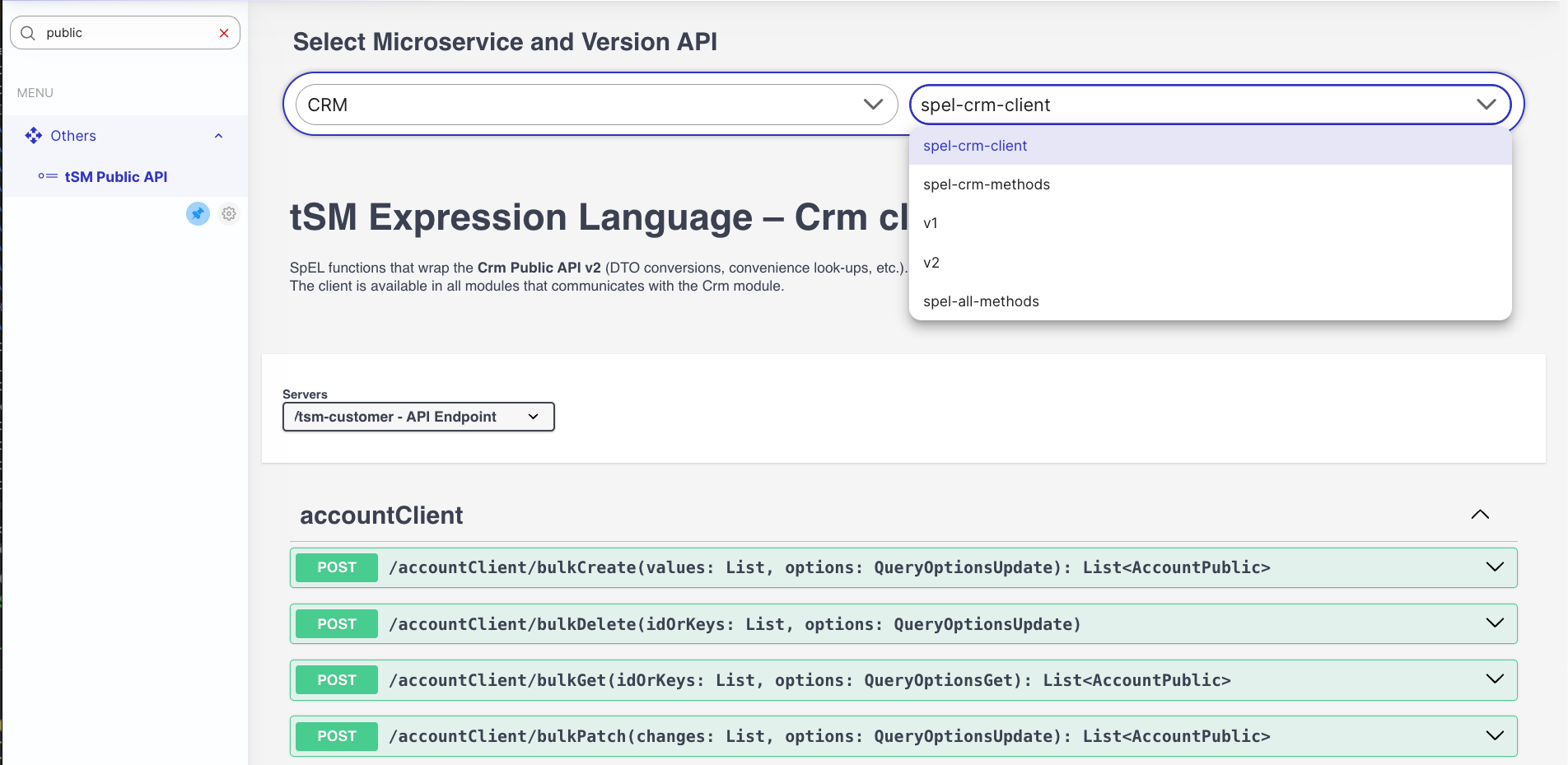
Where to look up the full method catalogue
The client families described in chapter 1.1 map 1-to-1 to the endpoints of the Public REST API. Whenever you need the exact signature, parameter list or response schema, open the Swagger documentation shipped with every microservice:
| Location in UI | What it lists | When to use |
|---|---|---|
spel-xxx-client (e.g. spel-crm-client) | Only the client methods & their query-option objects. | Fast look-up while writing SpEL – concise and free of noise. |
spel-crm-methods (or analogous name) | Business-level helper functions implemented inside the microservice. | Discover domain-specific shortcuts (approveOrder, calculateDiscount, …). |
spel-all-methods | Everything the microservice exposes – business methods, low-level core helpers and every client method. | Reference & debugging; the list is huge. |
v2 | Standard Public API (OpenAPI v3). | When you integrate over HTTP from outside tSM. |
v1 | Legacy Public API. | Needed only for backward compatibility. |
Tip – start with
spel-xxx-clientfor day-to-day SpEL work. It shows exactly the calls you can embed in a script, organised and documented just for that purpose.
Happy automating – and may your transactions always commit exactly the way you expect!