Service Worker Deployment (On-Premise)
This guide is the installation and troubleshooting reference for the tSM frontend Service Worker in customer-managed on-premise environments. It applies to tSM versions 2.4 and 2.5.
Start with the quick installation path below. Open the technical sections only when you need a configuration example, validation script, or explanation of a failure.
- Deploy a Service Worker-enabled production artifact containing
custom-worker.js,ngsw-worker.js, andngsw.json. - Serve the application over HTTPS with a valid certificate trusted by representative client devices.
- After changing any generated frontend file, regenerate and verify
ngsw.jsonbefore publication. - Serve static files directly. Do not rewrite them or redirect them to a login page or SPA fallback.
- Publish one complete release consistently, ensure every replica returns identical bytes, and keep files needed by existing browser tabs available during the transition.
Datalite guarantees the integrity of the frontend artifact as delivered. Service Worker operation cannot be guaranteed after the artifact or its delivery path is changed unless the complete deployment is validated again.
Use the section that matches your task:
- first installation or upgrade: Quick installation guide;
- acceptance check: How to verify that it works;
- incident diagnosis: Troubleshooting by symptom;
- scripts and infrastructure examples: Technical reference.
Quick installation guide
1. Validate and finalize the artifact
Verify the delivery checksum and confirm that custom-worker.js, ngsw-worker.js, and ngsw.json are present. Apply only supported customer configuration, then regenerate and validate ngsw.json if any hashed file changed.
Expected result: the final deployment directory is complete and every local manifest hash is valid.
2. Configure HTTPS
Use the final production hostname and a certificate with a valid date, matching Subject Alternative Name, complete chain, and trust on representative client devices. Do not use a browser certificate exception or curl -k as an acceptance test.
Expected result: the application and every static Service Worker file load without a certificate, mixed-content, or cross-origin error.
3. Configure the web server and proxies
Serve worker scripts, ngsw.json, configuration, and hashed assets as real files with correct MIME types and cache headers. Missing static files must return 404; they must not return index.html, SSO, or another HTML page with status 200.
Expected result: every Service Worker URL returns the requested bytes directly, without a redirect or response-body transformation.
4. Deploy one consistent release
Prepare and validate the complete new release before making it available to users. If the frontend remains online, use an atomic, blue/green, or otherwise release-consistent switch.
If such a switch is not available, block frontend traffic with a technically enforced maintenance window until the new version has been fully deployed and verified. Keep files required by previously opened browser tabs available for a limited time.
Expected result: new users receive one complete version, while existing browser tabs can finish without missing lazy chunks.
5. Run the acceptance checks
Run the local hash verifier, validate the deployed endpoints from a representative client network, confirm browser registration, and perform a real release A → release B update.
Expected result: the worker is activated, the page is controlled, <base-path>/ngsw/state reports Driver state: NORMAL, and the update completes without losing the current URL.
How to verify that it works
The following screenshot shows a healthy registration in Chrome DevTools:
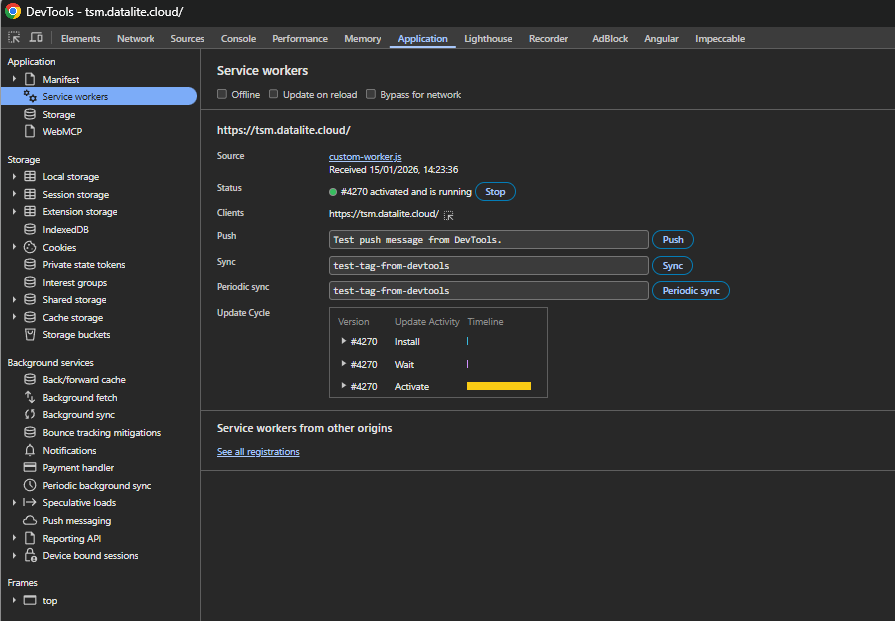
A healthy deployment has all of these properties:
- the registration is shown under the expected application origin and scope;
- Source is
custom-worker.js; - the main Status line is green and says
activated and is running; - after one reload, the application URL appears under Clients;
- Offline, Update on reload, and Bypass for network are not selected;
<base-path>/ngsw/statereportsDriver state: NORMAL;- a controlled release A → release B update finishes successfully.
What do Install, Wait, Activate, waiting, and stopped mean?
The Install, Wait, and Activate rows in Update Cycle show lifecycle stages for one worker version. They are not three simultaneously active workers.
waitingcan be temporary while an older worker controls open tabs. Investigate when it never activates after the tSM update flow completes and old clients are closed or reloaded.stoppedis not necessarily a failure. Browsers stop idle workers and restart them for events. Investigate only when the worker cannot restart or control the page.activatedwithout the application under Clients after a reload usually means that the page is outside the worker scope or deliberately bypasses the worker.redundant, a registration error, or a worker that cannot start is a failure and requires console and network inspection.
Do not use Update on reload as the normal acceptance mode. It changes browser behavior and can hide real lifecycle timing issues.
Technical reference
How the tSM Service Worker files work together
The production frontend contains the following related files:
| File | Purpose | Required behavior |
|---|---|---|
index.html | Application entry point | Must match its hash and must not be rewritten after deployment |
custom-worker.js | Registered Service Worker entry point | Must be served as JavaScript and imports ngsw-worker.js |
ngsw-worker.js | Angular Service Worker runtime | Must be directly accessible from the same origin |
ngsw.json | Generated release manifest | Must be fresh, valid JSON, and published only with the matching files |
config.json and *.config.json | Deployment-specific frontend configuration | Must be finalized before manifest generation because these files are hashed |
| Hashed JavaScript and CSS bundles | Application code and styles | Filenames and contents must remain unchanged |
| Assets, fonts, and images | Lazily cached frontend resources | Paths and contents must remain consistent across replicas |
The application registers custom-worker.js, which loads the Angular runtime from ngsw-worker.js. The runtime downloads ngsw.json, treats it as the description of one complete application version, and validates cached files against the SHA-1 values in hashTable.
All files must be served from the application's expected origin and base path. An origin consists of the protocol, hostname, and port.
Responsibility matrix and support boundary
| Area | Datalite | Customer infrastructure team |
|---|---|---|
| Original frontend build and generated manifest | Provides a mutually consistent artifact | Verifies the delivered checksum before installation |
| Customer-specific configuration | Documents supported configuration points | Applies final values before hash generation |
| DNS, TLS, certificate renewal, and client trust | Provides application requirements | Owns configuration and continuous validity |
| NGINX, ingress, load balancer, WAF, and CDN | Provides requirements and examples | Owns routing, caching, MIME types, and response integrity |
| Rollout across replicas | Provides deployment requirements | Ensures atomic and consistent publication |
| Browser policies and storage | Provides supported behavior | Ensures Service Workers and site storage are allowed |
| Modified generated files | Cannot guarantee the modified artifact | Regenerates and verifies ngsw.json |
HTTPS, certificate, and browser prerequisites
Service Worker registration is available only in a secure browser context. For an on-premise installation:
- The application URL, including protocol, hostname, port, and base path, must remain stable.
- The certificate must be within its validity period and contain the requested hostname in its Subject Alternative Name.
- The server must present the complete chain, including required intermediate certificates.
- The root or issuing enterprise CA must be trusted by every supported client device.
- TLS inspection performed by a corporate proxy must use a CA trusted by the clients.
- No certificate warning may be bypassed as part of the operating procedure.
- Static files must load without mixed-content or cross-origin violations.
- Browser policy must permit Service Workers, JavaScript, required authentication cookies, and site storage.
- Client and infrastructure clocks must be synchronized.
A certificate that works on an administrator's workstation can still fail on managed devices with a different trust store. Test from a representative client network and browser. Do not use curl -k; it suppresses the validation that the test is intended to verify.
Artifact integrity and ngsw.json
Post-build changes are the most common reason why Angular rejects a new frontend version. Follow the supported procedure below; open the detailed sections when you must regenerate or diagnose the manifest.
Why post-build changes and response rewriting break updates
The generated ngsw.json contains a SHA-1 hash for every file selected by the tSM Service Worker configuration. The hash is calculated from the exact file bytes in the final build directory.
If a deployment process subsequently changes config.json, index.html, line endings, encoding, injected environment values, JavaScript, CSS, or another hashed file, the recorded hash is no longer valid. The Service Worker retries a mismatched request with a cache-busting query parameter. If the bytes still do not match, it rejects the complete application version.
Transport compression is allowed when configured correctly. Hash the original deployed file, not a pre-compressed .gz or .br file. The server must return the correct Content-Encoding so the browser reconstructs the original bytes.
CSP nonces and response-time rewriting
A Content Security Policy header does not affect file hashes, but changing a response body does. Do not apply NGINX sub_filter, per-request CSP nonce injection, envsubst, HTML optimization, a WAF banner, or another response transformation to index.html or any file present in ngsw.json.
If a placeholder in index.html is replaced with a different nonce for every request, the served bytes change for every request. No single recalculated hash can match that behavior. Use a stable build-time representation or a Datalite-approved CSP integration that does not mutate hashed response bodies.
An NGINX sub_filter directive is harmless only when its searched token is absent from the response. Verify the served body instead of assuming that the filter made no change.
Supported procedure
The supported order is:
- Obtain the release artifact.
- Apply customer-specific configuration through the supported build or packaging process.
- Generate
ngsw.jsonfrom the final, unmodified deployment directory. - Verify all manifest hashes.
- Publish that directory without any further content transformation.
Do not edit minified JavaScript, CSS, or hashed bundles manually. Rebuild the frontend instead.
Regenerate the complete manifest
The safest method is to use the ngsw-config tool and ngsw-config.json from the exact Angular toolchain used to build the release:
npx ngsw-config <deployment-root> <matching-ngsw-config.json> <base-href>
For an application deployed at the origin root, <base-href> is /. For a sub-path deployment it must match the application base path, for example /tsm/.
This command overwrites <deployment-root>/ngsw.json. Run it in a staging directory after all configuration substitution and before publication. Do not use a different Angular Service Worker major version.
If the customer does not have the matching configuration and toolchain, request a regenerated artifact from Datalite instead of guessing the manifest structure.
Exceptional case: update one existing hashed file
For an exceptional single-file change, such as a final config.json substitution, update its existing hashTable entry using SHA-1. The URL key must already exist in the manifest. Adding only a new hash does not add a new file to an asset group.
The following dependency-free Node.js script updates config.json in an application artifact deployed at the origin root:
import {createHash} from 'node:crypto';
import {readFileSync, writeFileSync} from 'node:fs';
import {resolve} from 'node:path';

const file = resolve(process.argv[2] ?? 'config.json');
const url = process.argv[3] ?? '/config.json';
const manifestFile = resolve('ngsw.json');
const manifest = JSON.parse(readFileSync(manifestFile, 'utf8'));

if (!(url in manifest.hashTable)) {
  throw new Error(`${url} is not present in ngsw.json hashTable`);
}

manifest.hashTable[url] = createHash('sha1')
  .update(readFileSync(file))
  .digest('hex');
manifest.timestamp = Date.now();

writeFileSync(manifestFile, `${JSON.stringify(manifest, null, 2)}\n`);
console.log(`${url}: ${manifest.hashTable[url]}`);
Run it from the application artifact root:
node update-ngsw-hash.mjs config.json /config.json
For a sub-path deployment, use the actual key from ngsw.json, for example /tsm/config.json. After this operation, run the full manifest verification and publish ngsw.json together with the modified file.
This single-file procedure is not a replacement for regenerating the manifest when files are added, removed, renamed, or when cache groups change. In those cases, regenerate the complete ngsw.json.
Local verifier: check every hash in the final directory
Save the following script outside the application artifact and run it against the final directory. It supports both root and sub-path manifests:
import {createHash} from 'node:crypto';
import {existsSync, readFileSync} from 'node:fs';
import {join, resolve} from 'node:path';

const root = resolve(process.argv[2] ?? '.');
const manifest = JSON.parse(
  readFileSync(join(root, 'ngsw.json'), 'utf8'),
);
const basePath = manifest.index.slice(
  0,
  manifest.index.lastIndexOf('/') + 1,
);
let failures = 0;

for (const [url, expected] of Object.entries(manifest.hashTable)) {
  if (!url.startsWith(basePath)) {
    console.error(`URL outside base path: ${url}`);
    failures++;
    continue;
  }

  const relativePath = decodeURIComponent(url.slice(basePath.length));
  const file = join(root, ...relativePath.split('/'));

  if (!existsSync(file)) {
    console.error(`MISSING  ${url} -> ${file}`);
    failures++;
    continue;
  }

  const actual = createHash('sha1')
    .update(readFileSync(file))
    .digest('hex');

  if (actual !== expected) {
    console.error(`INVALID  ${url}: expected ${expected}, got ${actual}`);
    failures++;
  }
}

if (failures > 0) {
  console.error(`Validation failed: ${failures} problem(s)`);
  process.exitCode = 1;
} else {
  console.log('All ngsw.json hashes are valid.');
}
Example:
node verify-ngsw.mjs /opt/tsm-ui/releases/2.5.0
Run this validation separately for the files mounted into the running container. A Kubernetes ConfigMap, init container, envsubst, or startup script can change config.json after the container image was built.
Browser verifier: check the bytes served through the production path
The local Node.js verifier checks files on disk. The following browser-console script checks the bytes actually returned through HTTPS, Ingress, proxies, caches, and the load balancer.
It adds both ngsw-bypass and a random query value, so the requests bypass the active Angular Service Worker and avoid reusing a cached response. It downloads every file from ngsw.json with at most six concurrent requests. The script reports progress in approximately 5% increments and records a request as failed if it does not complete within 20 seconds.
- Open the deployed tSM application.
- Open browser developer tools and select Console.
- Paste and run the complete script.
- Preserve the resulting table when reporting an incident.
The console may immediately display Promise {<pending>}. This is the normal return value of the asynchronous script, not an error. Follow the [SW verify] messages printed below it; large releases can contain thousands of files and take several minutes to verify.
(async () => {
  const CONCURRENCY = 6;
  const REQUEST_TIMEOUT_MS = 20_000;
  const startedAt = performance.now();

  console.log('[SW verify] Starting deployed hash verification...');

  const withBypass = (value) => {
    const url = new URL(value, document.baseURI);
    url.searchParams.set('ngsw-bypass', 'true');
    url.searchParams.set(
      '_tsm_sw_verify',
      `${Date.now()}-${Math.random()}`,
    );
    return url;
  };

  const fetchBody = async (value, readBody) => {
    const url = withBypass(value);
    const controller = new AbortController();
    const timeoutId = setTimeout(
      () => controller.abort(),
      REQUEST_TIMEOUT_MS,
    );

    try {
      const response = await fetch(url, {
        cache: 'no-store',
        credentials: 'same-origin',
        signal: controller.signal,
      });

      if (!response.ok) {
        throw new Error(`HTTP ${response.status}`);
      }

      if (response.redirected) {
        throw new Error(`redirected to ${response.url}`);
      }

      return {
        body: await readBody(response),
        finalUrl: response.url,
      };
    } catch (error) {
      const reason = controller.signal.aborted
        ? `timeout after ${REQUEST_TIMEOUT_MS / 1000} seconds`
        : error instanceof Error
          ? `${error.name}: ${error.message}`
          : String(error);

      throw new Error(`${url.pathname}: ${reason}`);
    } finally {
      clearTimeout(timeoutId);
    }
  };

  const sha1 = async (bytes) =>
    Array.from(
      new Uint8Array(await crypto.subtle.digest('SHA-1', bytes)),
      (byte) => byte.toString(16).padStart(2, '0'),
    ).join('');

  const {body: manifest} = await fetchBody(
    new URL('ngsw.json', document.baseURI),
    (response) => response.json(),
  );
  const entries = Object.entries(manifest.hashTable ?? {});
  const failures = [];
  let cursor = 0;
  let completed = 0;

  if (entries.length === 0) {
    throw new Error('ngsw.json does not contain any hashTable entries');
  }

  const progressInterval = Math.max(1, Math.ceil(entries.length / 20));

  console.log(
    `[SW verify] Manifest contains ${entries.length} files.`,
  );

  const verifyNext = async () => {
    while (cursor < entries.length) {
      const [path, expected] = entries[cursor++];

      try {
        const {body, finalUrl} = await fetchBody(
          path,
          (response) => response.arrayBuffer(),
        );
        const actual = await sha1(body);

        if (actual !== expected.toLowerCase()) {
          failures.push({
            path,
            expected,
            actual,
            finalUrl,
          });
        }
      } catch (error) {
        failures.push({
          path,
          error:
            error instanceof Error
              ? `${error.name}: ${error.message}`
              : String(error),
        });
      } finally {
        completed += 1;

        if (
          completed === entries.length ||
          completed % progressInterval === 0
        ) {
          console.log(
            `[SW verify] Checked ${completed}/${entries.length}; failures: ${failures.length}.`,
          );
        }
      }
    }
  };

  await Promise.all(
    Array.from(
      {length: Math.min(CONCURRENCY, entries.length)},
      () => verifyNext(),
    ),
  );

  const elapsedSeconds = (
    (performance.now() - startedAt) /
    1000
  ).toFixed(1);

  if (failures.length === 0) {
    console.log(
      `[SW verify] Passed for ${entries.length} files in ${elapsedSeconds} seconds.`,
    );
  } else {
    console.error(
      `[SW verify] Failed for ${failures.length} of ${entries.length} files in ${elapsedSeconds} seconds.`,
    );
    console.table(failures);
  }

  return {
    checked: entries.length,
    failures,
    elapsedSeconds: Number(elapsedSeconds),
  };
})().catch((error) => {
  console.error('[SW verify] Fatal error:', error);
});
This check can download a significant part of the frontend release. Run it during installation validation or incident diagnosis, not as continuous monitoring. A passing result proves that the current browser path received bytes matching the current manifest; it does not replace the local artifact check on every replica.
Web server and reverse-proxy configuration
Required routing behavior
The following URLs must return the corresponding files directly:
<base-path>/custom-worker.js<base-path>/ngsw-worker.js<base-path>/ngsw.json<base-path>/index.html<base-path>/config.json- every URL listed under
hashTableinngsw.json
Requirements:
- Return
200only when the requested file exists. - Do not return the SPA fallback for a missing static file.
- Do not redirect worker or manifest requests to SSO, a login page, or another hostname.
- Preserve query parameters such as
ngsw-cache-bust; an intermediate cache must not ignore them and return stale content. - Serve JavaScript with a valid JavaScript media type, JSON as
application/json, CSS astext/css, and the web manifest asapplication/manifest+json. - Allow the registered worker scope. With the standard layout, the worker script is in the application root and its default scope is correct.
- If a broader scope requires
Service-Worker-Allowed, return that header on the registeredcustom-worker.jsresponse, not only on the importedngsw-worker.jsresponse. - If Content Security Policy is used, allow the same-origin worker, for example with
worker-src 'self'. Integrate this directive into the site's complete CSP rather than replacing the existing policy.
Recommended cache policy
| Resource | Recommended HTTP policy |
|---|---|
ngsw.json | Cache-Control: no-store or mandatory revalidation |
custom-worker.js | Cache-Control: no-cache |
ngsw-worker.js | Cache-Control: no-cache |
index.html | Cache-Control: no-cache |
config.json, *.config.json | Cache-Control: no-cache; update the manifest whenever content changes |
| Content-hashed JS/CSS files | May use long-lived public, max-age=31536000, immutable caching |
| Unhashed assets | Use a policy compatible with the application's update requirements |
A CDN or reverse proxy must not cache ngsw.json beyond deployment boundaries. Otherwise clients can receive an old manifest together with new files, or a new manifest together with old files.
Complete NGINX example
The following example assumes deployment at the origin root. Adapt every exact location consistently when the application is hosted under a sub-path:
server {
    listen 443 ssl;
    server_name tsm.example.com;
    root /opt/tsm-ui/current;

    include mime.types;

    # Never apply sub_filter or another body transformation to hashed files.

    location = /ngsw.json {
        try_files $uri =404;
        default_type application/json;
        expires off;
        etag off;
        if_modified_since off;
        add_header Cache-Control "no-cache, no-store, must-revalidate" always;
        add_header Pragma "no-cache" always;
    }

    location = /custom-worker.js {
        try_files $uri =404;
        default_type application/javascript;
        expires off;
        etag off;
        if_modified_since off;
        add_header Cache-Control "no-cache, no-store, must-revalidate" always;
        add_header Pragma "no-cache" always;
    }

    location = /ngsw-worker.js {
        try_files $uri =404;
        default_type application/javascript;
        expires off;
        etag off;
        if_modified_since off;
        add_header Cache-Control "no-cache, no-store, must-revalidate" always;
        add_header Pragma "no-cache" always;
    }

    location = /index.html {
        try_files $uri =404;
        add_header Cache-Control "no-cache";
    }

    location = /config.json {
        try_files $uri =404;
        default_type application/json;
        expires off;
        etag off;
        if_modified_since off;
        add_header Cache-Control "no-cache, no-store, must-revalidate" always;
        add_header Pragma "no-cache" always;
    }

    location ~* \.config\.json$ {
        try_files $uri =404;
        default_type application/json;
        expires off;
        etag off;
        if_modified_since off;
        add_header Cache-Control "no-cache, no-store, must-revalidate" always;
        add_header Pragma "no-cache" always;
    }

    # Missing static files must be real 404 responses.
    location ~* \.(?:js|css|map|json|webmanifest|woff2?|ttf|png|jpg|svg)$ {
        try_files $uri =404;
    }

    # SPA fallback is only for application navigation.
    location / {
        try_files $uri $uri/ /index.html;
    }
}
This is a Service Worker-focused example, not a complete production NGINX configuration. Add the customer's TLS, API proxy, security headers, logging, and limits separately.
Atomic and multi-replica deployment
A Service Worker version is an indivisible set of files. Do not expose a partially copied release.
Two concerns during a frontend update
A safe frontend update must handle two separate concerns:
- Publishing the new version safely. Users must never receive a partially deployed version or different versions from different frontend replicas.
- Supporting users who still have the previous version open. Existing browser tabs may still need lazy-loaded files from the previous version, so keep those files available for a limited time after the update.
The release switch keeps the new version consistent. Temporary retention of previous hashed files allows already open browser tabs to continue working. Keeping hashed files from releases A and B available at the same time does not mix the active application: their URLs are different, while the active index.html, configuration, and ngsw.json still belong to one release.
Recommended release-directory deployment
- Copy the complete artifact to a new immutable release directory.
- Apply final configuration and regenerate
ngsw.json. - Run the local hash verifier.
- Validate the release on every node before it receives traffic.
- Switch the active release atomically.
- Keep previous content-hashed files reachable at their original public URLs long enough for existing browser tabs to finish using lazy-loaded chunks.
When an atomic directory switch is not available
When an atomic directory switch is not available:
Sequentially replacing the active release is not supported while users can access the frontend. Publishing ngsw.json last reduces the risk of exposing an incomplete release, but it does not make an online sequential deployment fully consistent.
Use a technically enforced maintenance window:
- Block frontend traffic at the load balancer, ingress, or network layer. A maintenance announcement alone is not sufficient.
- Drain and disconnect the old frontend replicas.
- Deploy the complete new version to every replica.
- Verify the release, its hashes, and the responses from every replica.
- Restore traffic only after all checks pass.
Keep previous hashed chunks available after traffic is restored so that already open browser tabs can finish using the previous version.
Load balancers and rolling updates
Every request for a given URL must return identical bytes, regardless of the selected replica. During a normal rolling update, one pod serving release A and another serving release B under the same hostname can return different ngsw.json, index.html, or config.json content.
Sticky sessions are not a sufficient integrity guarantee. A mixed A/B rolling update is not supported under one public endpoint unless the delivery path still guarantees identical responses. Use one of these approaches:
- a shared immutable static artifact;
- an atomic release switch for all frontend replicas;
- versioned static origins with a controlled switch;
- an enforced maintenance window that drains old replicas before the new release becomes public.
Probe each replica directly, using the production Host header, before adding it to the load balancer.
Kubernetes-specific guidance
The reference tSM deployment serves the frontend from an NGINX container behind an Ingress. For an on-premise Kubernetes installation, also apply these controls:
- Pin the frontend image by digest or by a unique immutable release tag.
imagePullPolicy: Alwaysdoes not make a mutable tag an immutable release identity. - Never push different frontend contents under the same tag. Pods restarted at different times could then serve different application versions.
- Record the deployed image digest in the release evidence and verify that every pod uses it.
- When NGINX configuration is mounted from a ConfigMap with
subPath, update the ConfigMap and perform an explicit rollout. ExistingsubPathmounts do not receive live ConfigMap content updates. - Add a ConfigMap checksum annotation or another rollout trigger so all frontend pods receive the same NGINX configuration.
- Run hash validation after init containers, ConfigMap mounts, secret mounts, and startup substitutions have produced the final filesystem visible to NGINX.
- A liveness or readiness probe of
/proves only that NGINX can return the SPA. It does not prove thatngsw.json, worker scripts, and their hashes are valid. Perform the full validation in CI, an init container, or a dedicated deployment check. - Ensure the Ingress
tls.hostsentries, application hostnames, and certificate Secret match. Monitor certificate renewal and test both internal and external hostnames when they use different certificates or trust chains.
Detailed installation and acceptance procedure
Use this section when collecting installation evidence or reproducing an incident. The quick guide remains the primary deployment path.
1. Validate the artifact
- Compare the package checksum with the delivery checksum.
- Confirm the three Service Worker files are present.
- Apply supported configuration.
- Regenerate and validate
ngsw.json. - Confirm all replicas contain the same files.
Commands for HTTPS, static endpoints, and response stability
2. Validate HTTPS and static endpoints
From a representative client network:
BASE=https://tsm.example.com

curl --fail --silent --show-error --dump-header custom-worker.headers --output custom-worker.remote.js "$BASE/custom-worker.js"
curl --fail --silent --show-error --dump-header ngsw-worker.headers --output ngsw-worker.remote.js "$BASE/ngsw-worker.js"
curl --fail --silent --show-error --dump-header ngsw.headers --output ngsw.remote.json "$BASE/ngsw.json"
curl --fail --silent --show-error --dump-header config.headers --output config.remote.json "$BASE/config.json"
Verify:
- status
200, without a redirect; - expected
Content-Type; - appropriate
Cache-Control; - no certificate error;
- response is the requested file, not HTML from the SPA fallback or login page.
3. Verify response stability
Fetch a hashed response repeatedly through the production load balancer. The body hash must remain identical:
for i in 1 2 3 4 5; do
  curl --fail --silent --show-error "$BASE/index.html?probe=$i" | sha1sum
done
Repeat the test for config.json, ngsw.json, and any file reported in a hash mismatch. Alternating hashes indicate mixed replicas or an intermediary cache. A different hash on every request usually indicates dynamic response rewriting such as CSP nonce injection.
4. Validate registration in a clean browser session
Use a private browser window or a clean browser profile:
- Open the application over its production HTTPS URL.
- In browser developer tools, open Application → Service Workers.
- Confirm that
custom-worker.jsis registered for the expected scope. - Confirm the worker reaches activated/running state.
- Reload the page and verify that it is controlled by the Service Worker.
- Open
<base-path>/ngsw/statein the controlled browser tab and confirmDriver state: NORMAL.
Compare the result with How to verify that it works. The lifecycle explanation below the screenshot distinguishes normal transient states from failures.
5. Test an actual update
- Keep a tab on release A open.
- Deploy a complete and valid release B using an atomic switch or an enforced maintenance window.
- Reload or reopen the application to trigger an update check.
- Confirm release B is downloaded without a hash or network error.
- Accept or activate the update using the application's update notification.
- Verify that the page reloads into release B and preserves the current application URL.
- Verify that the old tab can still open a lazy route during the transition.
Update discovery and activation are asynchronous. The old version can continue serving the current tab until the new version is completely downloaded and activated.
Troubleshooting by symptom
First distinguish a normal update from a failure:
- a yellow update notification means that a new application version is ready and the user should save their work and reload;
- a red diagnostic warning means that the application detected a Service Worker, update, cache, or lazy-chunk failure.
The warning color is not the only indication of a failure. A diagnostic warning also contains a specific user-facing reason and, when the browser provides it, technical details. It does not by itself prove that the frontend contains a software defect.
The absence of a warning does not prove that the Service Worker is healthy. Some failures can occur before the application receives a diagnostic event or can prevent the application from loading at all. Always complete the registration and update acceptance tests in this guide.
Depending on the maintenance build, the warning can include a technical reason. Always record that value and the corresponding browser console message. If the browser exposes only TypeError: Failed to fetch, it does not reveal whether the underlying cause is TLS, DNS, proxy, offline state, filtering, or another network failure.
1. The Service Worker is not registered
Symptom: DevTools shows no registration for the application origin, or the UI reports serviceWorkerUnavailable or serviceWorkerRegistrationFailed.
Typical causes: a non-Service Worker production artifact, browser or enterprise policy, an incorrect scope, CSP, JavaScript MIME type, or custom-worker.js returning HTML instead of JavaScript.
Check: confirm the three Service Worker files in the artifact, request custom-worker.js directly, and inspect the browser console and Application → Service Workers.
2. The browser reports an insecure context or certificate error
Symptom: registration is absent or fails with serviceWorkerInsecureContext, SecurityError, or a browser certificate error.
Typical causes: HTTP, an expired certificate, hostname mismatch, incomplete chain, an untrusted enterprise CA, TLS inspection, or an incorrect client clock.
Check: validate the final hostname, certificate dates, Subject Alternative Name, full chain, and client trust from a representative device. Do not use a browser exception or curl -k.
3. A file does not match its hash in ngsw.json
Symptom: the red warning reports versionInstallationFailedConfig, versionInstallationFailed, or a hash mismatch with expected and actual values.
Typical causes: config.json, index.html, or another generated file changed after manifest generation; a proxy rewrote the response; a cache is stale; or replicas serve different releases.
Check: run both hash verifiers, compare every replica, correct the final artifact, and regenerate ngsw.json before publication.
4. A static URL returns 404, 500, HTML, or a login page
Symptom: installation fails even though the application shell can open, or Network shows a redirect or unexpected text/html response for JavaScript or JSON.
Typical causes: a missing artifact, SPA fallback, authentication interception, incorrect base path, or wrong MIME mapping.
Check: request the exact failing URL with cache-busting parameters and inspect status, redirect chain, Content-Type, cache headers, and body. Static files must be returned directly.
5. The problem is intermittent or differs between users
Symptom: repeated requests alternate between hashes, updates fail only sometimes, or users receive different application versions under one URL.
Typical causes: mixed frontend replicas, a partial rolling update, a stale intermediary cache, or mutable container tags.
Check: probe every replica with the production Host header, compare image digests and file hashes, and use an atomic switch. Sticky sessions are not an integrity guarantee.
6. The update check, download, or activation does not finish
Symptom: the update remains in a downloading or waiting state, or the UI reports updateCheckFailed or updateActivationFailed.
Typical causes: an unavailable ngsw.json, a missing prefetch resource, a hash mismatch, browser storage problems, or an incomplete release.
Check: inspect Network, console details, and <base-path>/ngsw/state; validate the artifact and restore a complete version before retrying.
7. A user receives ChunkLoadError after deployment
Symptom: an old browser tab fails when opening a lazy route and the red diagnostic warning reports chunkLoadError.
Typical cause: the tab still references a hashed chunk from release A, but that file was removed when release B was published.
Check: retain old hashed assets during the transition, publish atomically, and verify that existing tabs can still load a lazy route during the release A → B acceptance test.
8. DevTools looks healthy, but ngsw/state is degraded
Symptom: the worker is activated, but <base-path>/ngsw/state reports EXISTING_CLIENTS_ONLY, SAFE_MODE, or an unrecoverable state.
Meaning: browser registration works, but Angular cannot guarantee that one or more cached application versions are valid.
Check: preserve the state and debug log, restore a complete valid release, validate all hashes and replicas, and investigate storage errors. Do not clear the browser cache before collecting evidence.
UI reason-code reference
The reason codes below identify the corresponding application state for support and log correlation. The UI displays localized explanatory text rather than requiring users to interpret the code.
| Reason or UI state | Color | Meaning | First checks |
|---|---|---|---|
versionReady or no failure reason | Yellow | A valid update is ready for reload; this is normal operation | Save current work and complete the update from the notification |
serviceWorkerInsecureContext | Red | The page is not running in a trusted secure context | HTTPS URL, certificate validity, hostname, chain, and client trust |
serviceWorkerUnavailable | Red | The Service Worker API is unavailable or disabled while registration is expected | Browser support, enterprise policy, Service Worker and site-storage settings |
serviceWorkerRegistrationFailed | Red | No usable Service Worker registration was found after application startup | custom-worker.js, certificate, MIME type, CSP, scope, and browser console |
updateCheckFailed | Red | The check for a new application version failed | ngsw.json, Network panel, TLS, proxy, WAF, DNS, and connectivity |
updateActivationFailed | Red | A downloaded version could not be activated | Technical details, ngsw/state, browser storage, and console errors |
versionInstallationFailedConfig | Red | Served config.json does not match its hash in ngsw.json | Run both hash verifiers and regenerate the manifest after final configuration |
versionInstallationFailed | Red | Angular rejected the new version during installation | Exact technical details, missing files, hash mismatches, caches, and replica consistency |
chunkLoadError | Red | The current tab requested a lazy chunk that is no longer available | Retention of previous chunks, atomic rollout, and current release consistency |
unrecoverable | Red | The browser cache has no application version that Angular can guarantee as safe | ngsw/state, complete server artifact, cache/storage errors, and console details |
Additional technical symptoms
| Technical reason or symptom | Typical causes | Checks |
|---|---|---|
Hash mismatch ... expected ..., got/actual ... | File modified after manifest generation, stale proxy cache, mixed replicas, partial rollout | Compare served bytes with ngsw.json; run the verifier on every replica |
Repeated index.html downloads produce different hashes | Dynamic CSP nonce, NGINX sub_filter, WAF injection, or different replicas | Disable response-body rewriting for hashed files and repeat the stability test |
config.json hash mismatch | Runtime configuration mounted or substituted after build | Regenerate the hash after the final substitution |
Failed to fetch | Certificate, DNS, proxy, WAF, offline client, blocked request, or unavailable file | Test HTTPS without -k; inspect Network and proxy logs |
| Registration failed or insecure context | Invalid/untrusted certificate, HTTP URL, wrong JavaScript MIME type, CSP, scope, browser policy | Check certificate chain, worker response, CSP, and browser Application panel |
404, 500, or HTML returned for a static file | Incorrect routing, SPA fallback, missing artifact, authentication redirect | Request the exact file and inspect status, redirect chain, content type, and body |
ChunkLoadError | An old tab requested a lazy chunk already removed from the server | Retain old hashed assets and use atomic deployment |
EXISTING_CLIENTS_ONLY in ngsw/state | Latest application version is not valid, older cached clients are still usable | Inspect the state error and validate the newest artifact |
SAFE_MODE in ngsw/state | No cached version can be guaranteed as valid | Restore a complete valid release and inspect the debug log |
Do not make “clear browser cache” the primary deployment fix. It removes evidence and affects only one client. Correct the server-side artifact, certificate, routing, or caching problem first.
Information required for support
Include the following with a Service Worker incident:
- tSM version and exact frontend release identifier;
- application URL and base path;
- date, time, and timezone of the incident;
- browser name/version and operating system;
- screenshot and exact text of the yellow update notification or red diagnostic warning;
- console messages containing
[SwUpdate]; - screenshot of Application → Service Workers;
- contents of
<base-path>/ngsw/state; - response status and headers for
ngsw.json,custom-worker.js,ngsw-worker.js, and the failing file; - expected and actual hash for any mismatch;
- description of ingress, proxy, WAF, CDN, authentication, and load-balancer layers;
- hash comparison from every frontend replica;
- whether any file was modified, mounted, templated, or compressed after the delivered build.
Operational checklist
- Production Service Worker artifact is used.
- Delivery checksum is verified.
- Customer configuration is finalized before manifest generation.
- Every local
ngsw.jsonhash passes validation. - HTTPS certificate, hostname, dates, and full chain are valid.
- Enterprise CA is trusted on representative client devices.
- Worker and manifest URLs return direct
200responses with correct MIME types. - Missing static files return
404, not the SPA fallback. -
ngsw.jsonand worker scripts are not served from a stale cache. - WAF/CDN/proxy does not transform response bodies.
- CSP nonce handling does not rewrite
index.htmlor another hashed response at request time. - Cache-busting query parameters are honored.
- CSP permits the same-origin worker.
- All replicas serve byte-identical frontend artifacts.
- Kubernetes frontend image is pinned by digest or immutable release tag.
- ConfigMap changes trigger a rollout and all pods use the same mounted configuration.
- Repeated downloads through the load balancer produce identical body hashes.
- Online deployment uses an atomic, blue/green, or equivalent release-consistent switch.
- A non-atomic deployment runs only during a technically enforced maintenance window.
-
ngsw.jsonis published only after its complete matching release is available. - Previous hashed chunks remain reachable during the transition.
- Clean-browser registration test passes.
- Release A → release B update test passes.
-
ngsw/statereportsDriver state: NORMAL.